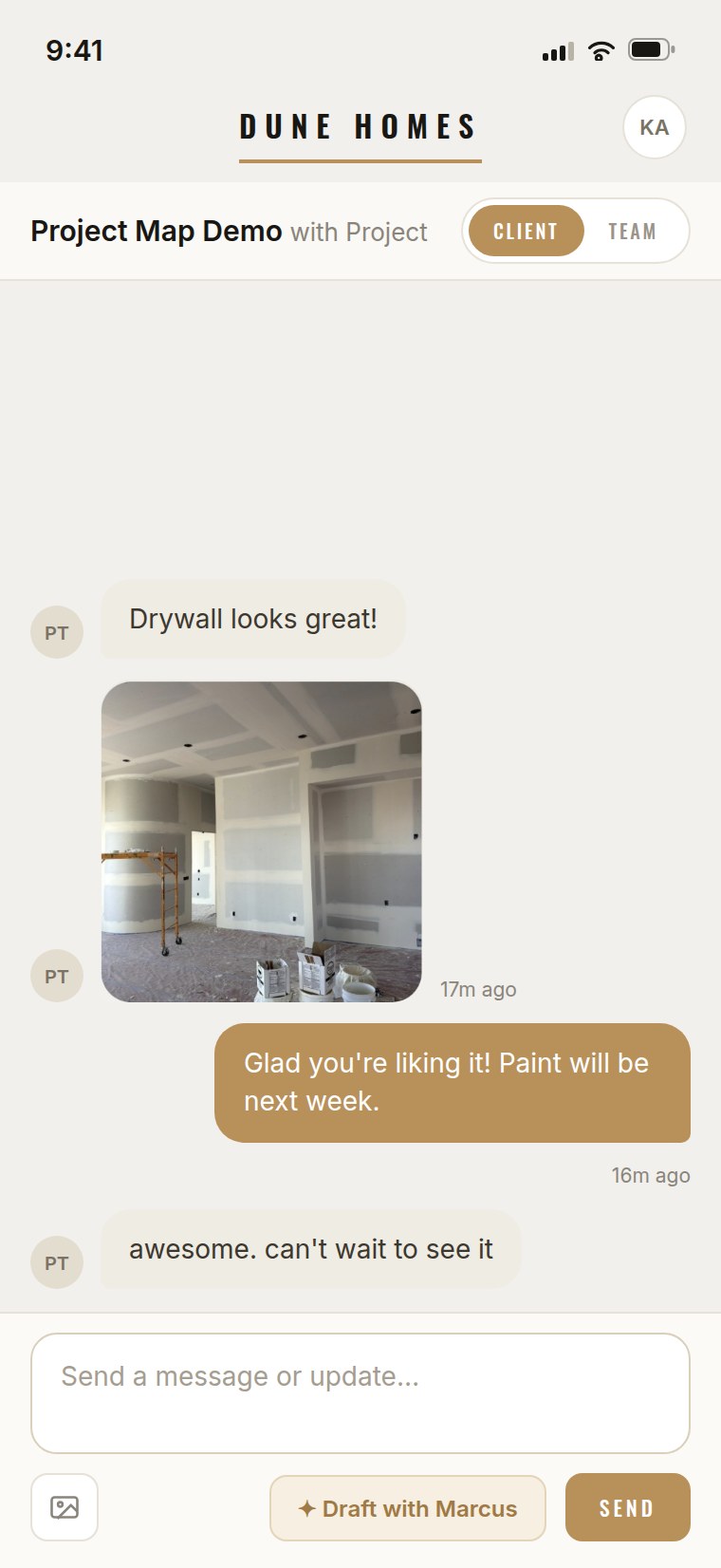
We paid Buildertrend for years and got something generic our clients wouldn't open. With Project Map we got a tracker that looks like Hearthwood, our clients actually log in, and budget calls dropped 60%. It costs less and feels like our software.
Your clients open your app.
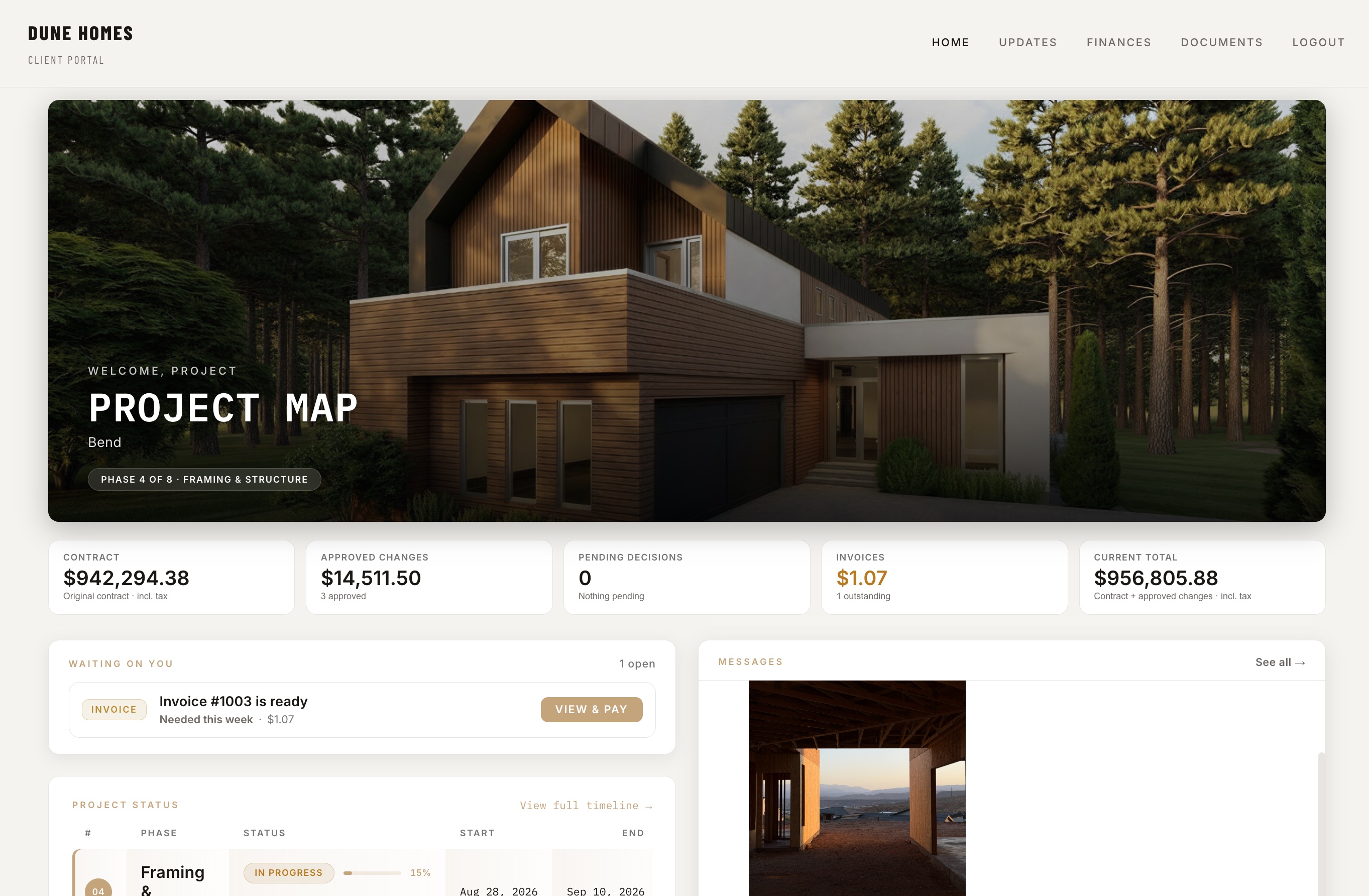
The whole job — estimates, budgets, invoicing, selections, change orders — under your logo, in your app on your clients' phones. Project Map appears nowhere. To your clients, you're the builder with their own software.
Cancel anytime · export your data anytime · founder price locked for life.
Your app. Their phone. No app store.
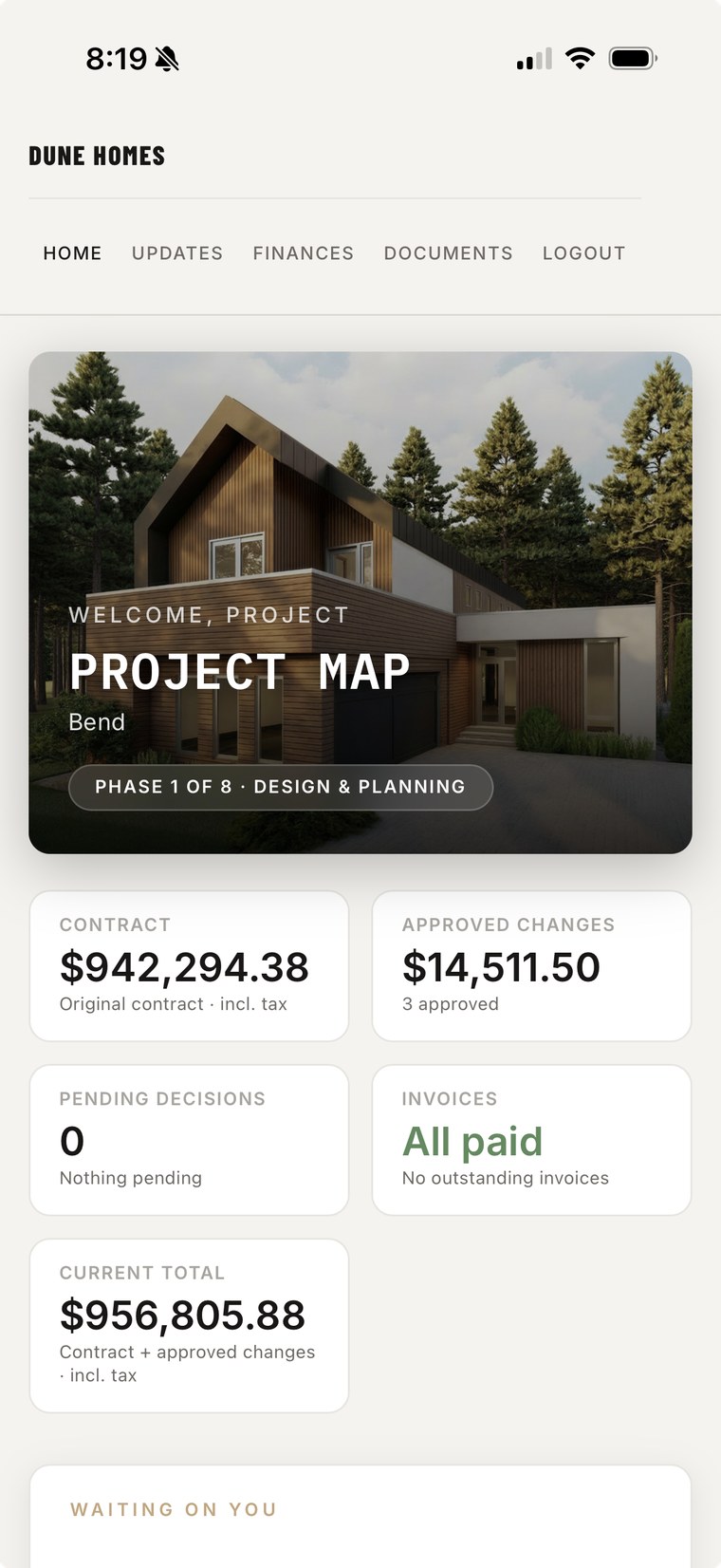
Your client taps an icon on their home screen: your logo, your company name. The portal installs to iPhone and Android as your app — no app store, no waiting on Apple, updates land instantly. Project Map shows up nowhere, not even on the permission pop-ups.
- One guided tap to install. The portal walks your client through it — no instructions from you, nothing to download.
- Real phone notifications, from your app. “Change order ready to sign” lands on their lock screen. “Your client signed” and “you got paid” land on yours. Every notification also emails — nothing relies on someone remembering to check a portal.
- The most professional builder they've ever hired. A branded app on their phone says “this operation has it together” every time they check on their house. That's who gets the referral — and who doesn't get their price questioned.
- Your numbers, protected. You decide what clients see, line by line: full cost-plus transparency or just the big numbers. Enforced at the data layer, so a client login can't pull your costs or markup, no matter how technical.


Everything a build needs. Nothing it doesn't.
Custom builds, remodels, or GC work — no subcontractor portals, no RFIs, no procurement bloat. Just the workflow you actually run, estimate to close-out, branded as your company.
Your AI employee. With a human approval on everything.
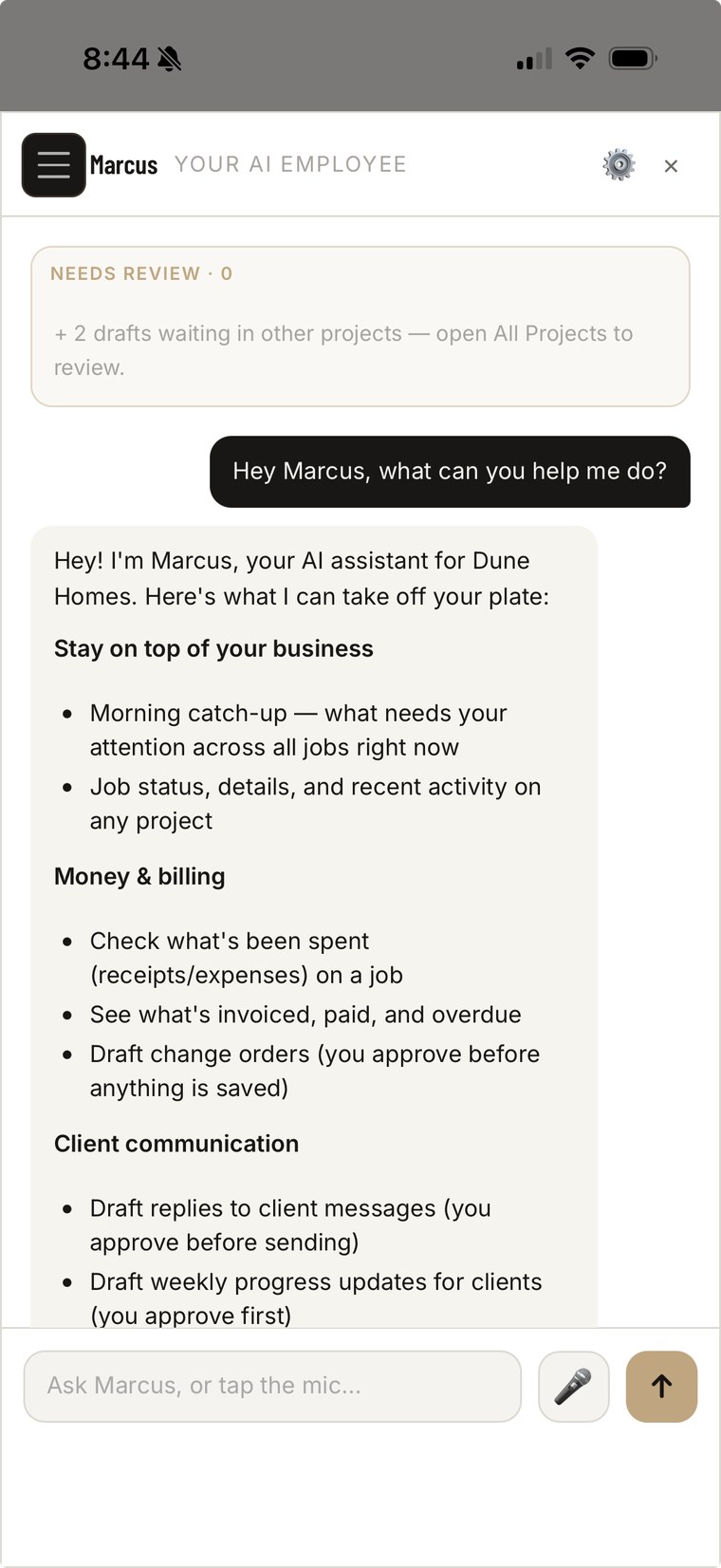
You don't need to learn AI — we built you an employee instead. Estimates eat more of your day than anything else, so Marcus starts there: talk to him, type to him, or hand him the plans, and he drafts the estimate, the budget, the daily log, and the client update. You keep every approval. He's not a chatbot bolted on — he's part of your company.
- Drafts estimates & budgets. Build one in a fraction of the clicks — Marcus drafts, you adjust and approve.
- Reads every receipt. Vendor, amount, date, and line items pulled automatically the moment you upload.
- Drafts your daily log. A clean summary from the day's activity — you just review and post.
- Writes the weekly client update. Client-ready, in your voice, every week. Your clients think you hired an office manager. You approved a draft from your truck.
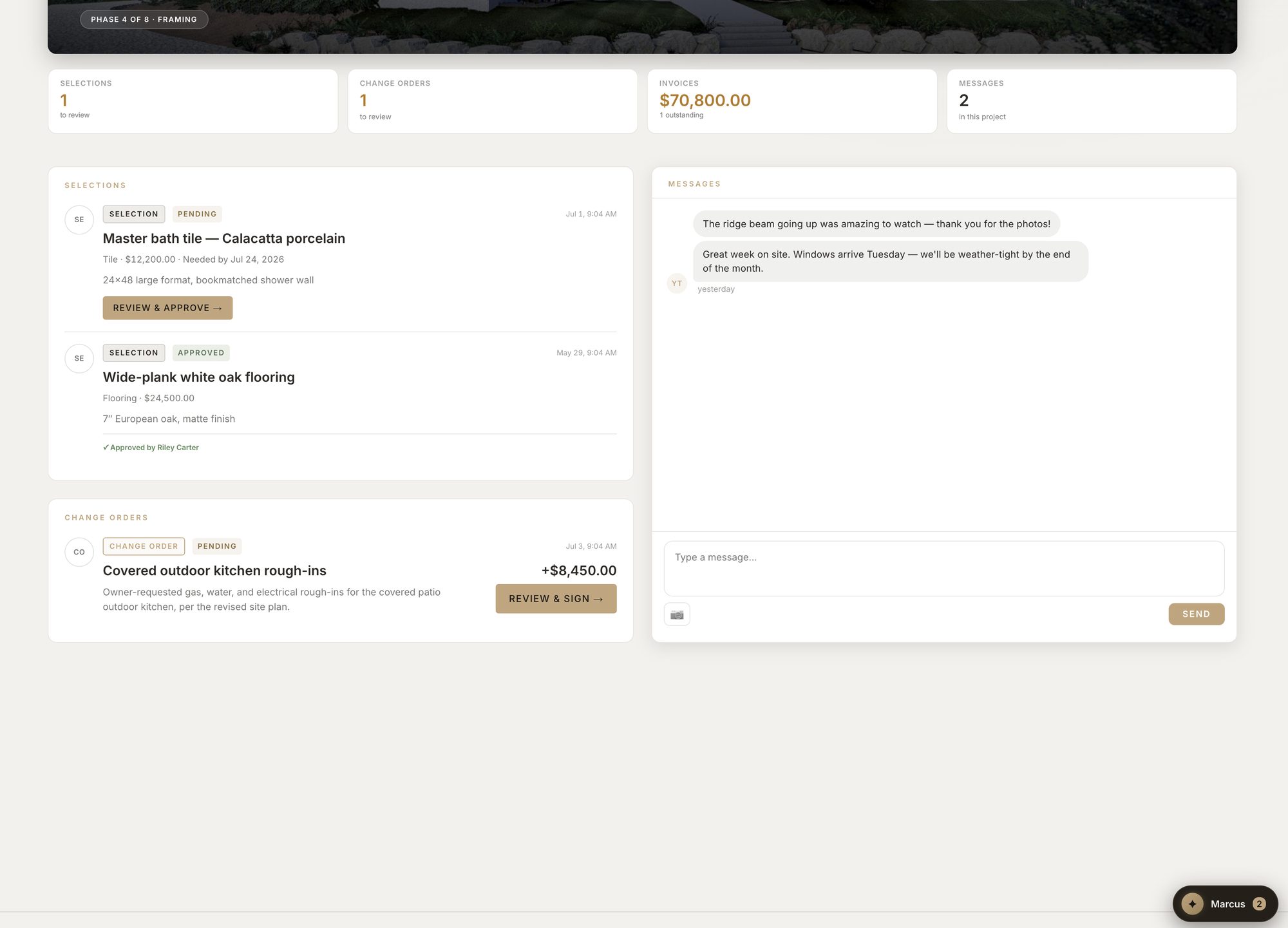
- Keeps selections moving. Drafts selection updates so decisions don't stall in a text thread.
- Respects roles. Your crew can't ask him for budgets, your bookkeeper can't read client messages, and PMs only see their own jobs. An AI employee with boundaries.
Hi Sarah — good week on site. Framing passed inspection Monday and the crew moved straight into electrical rough-in, which is about 60% complete.
Next up: insulation and drywall the week of the 28th. Your master-bath tile selection is the one open item — whenever you're ready.
This is a real job.
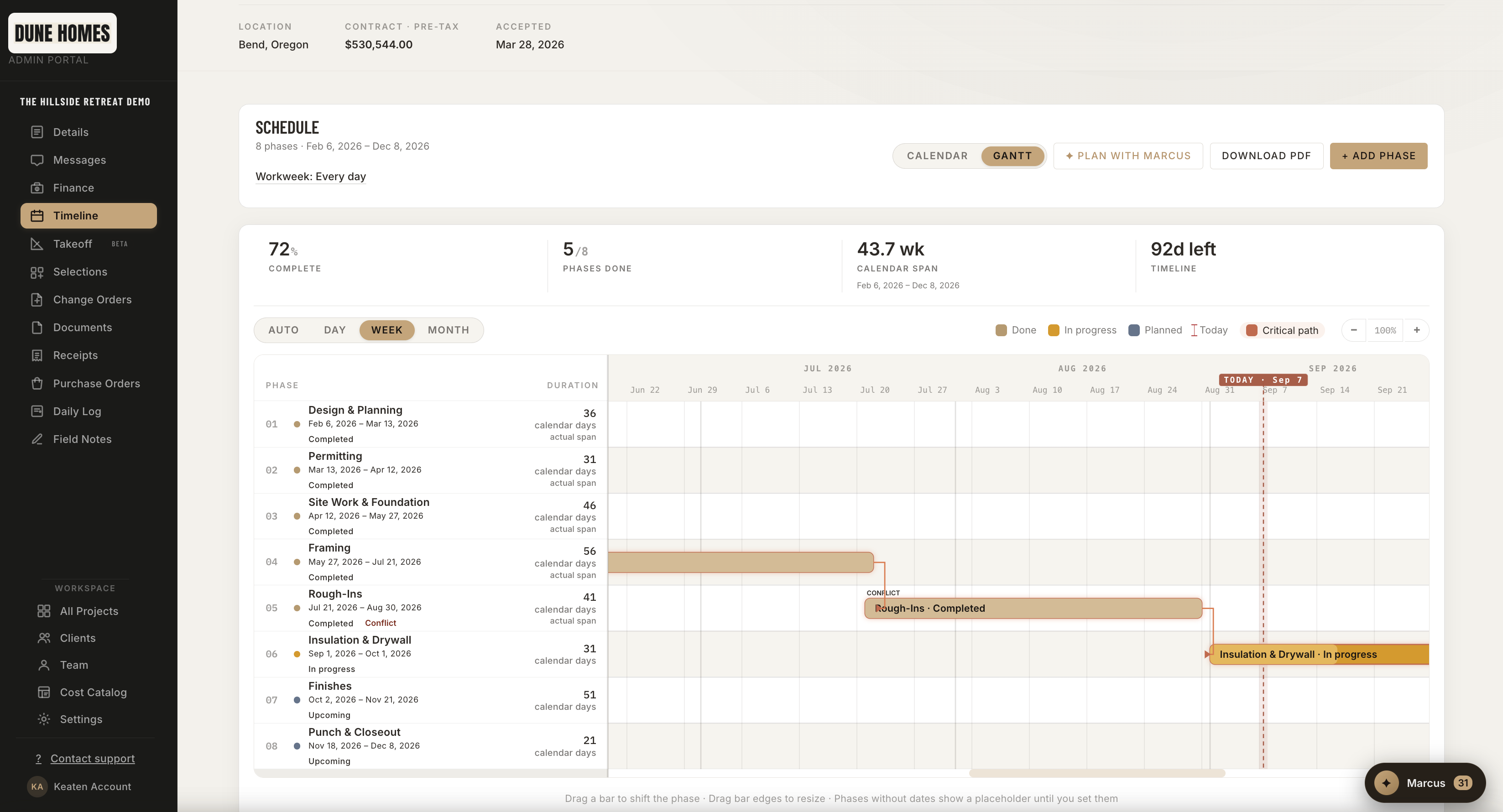
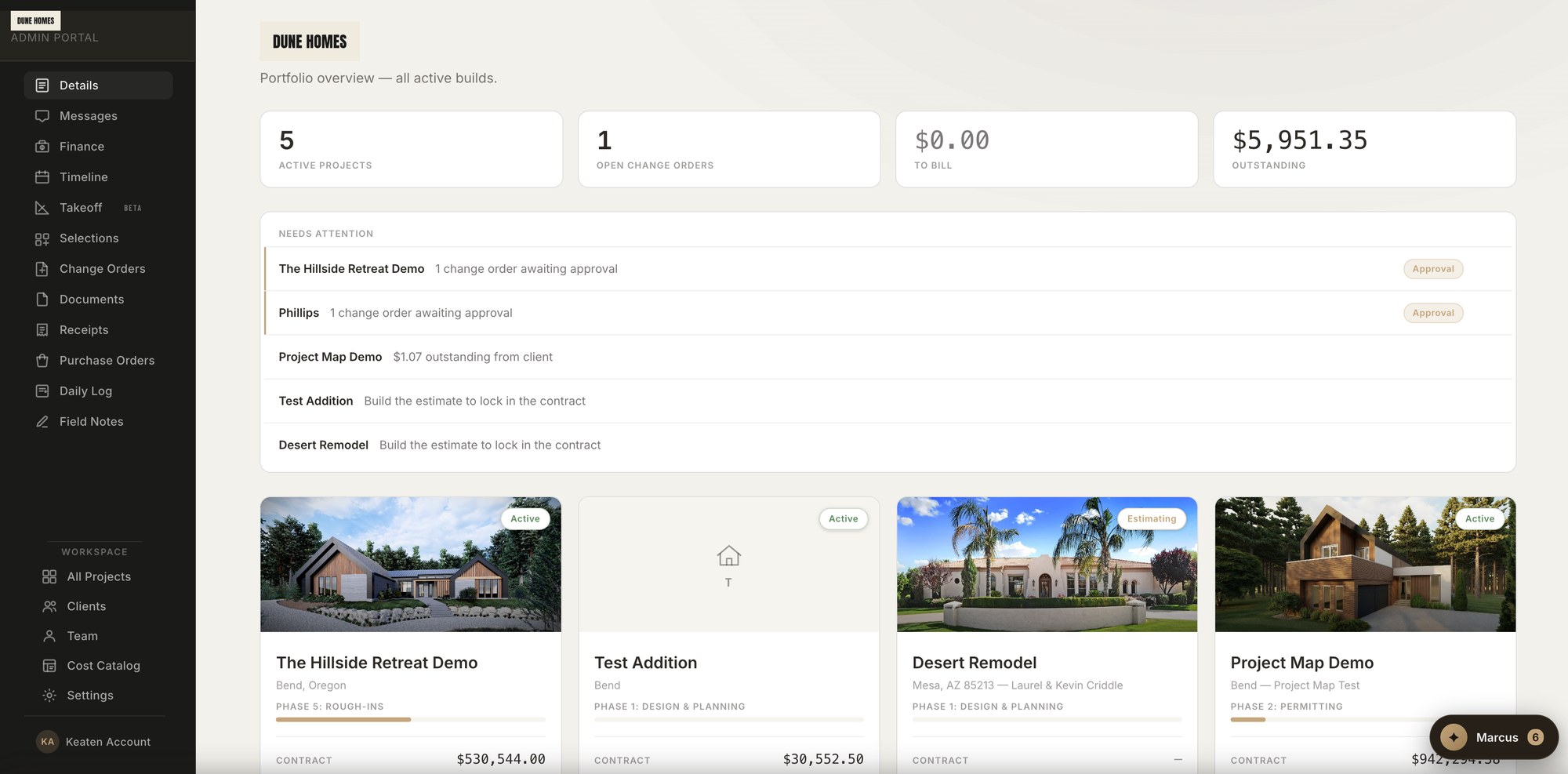
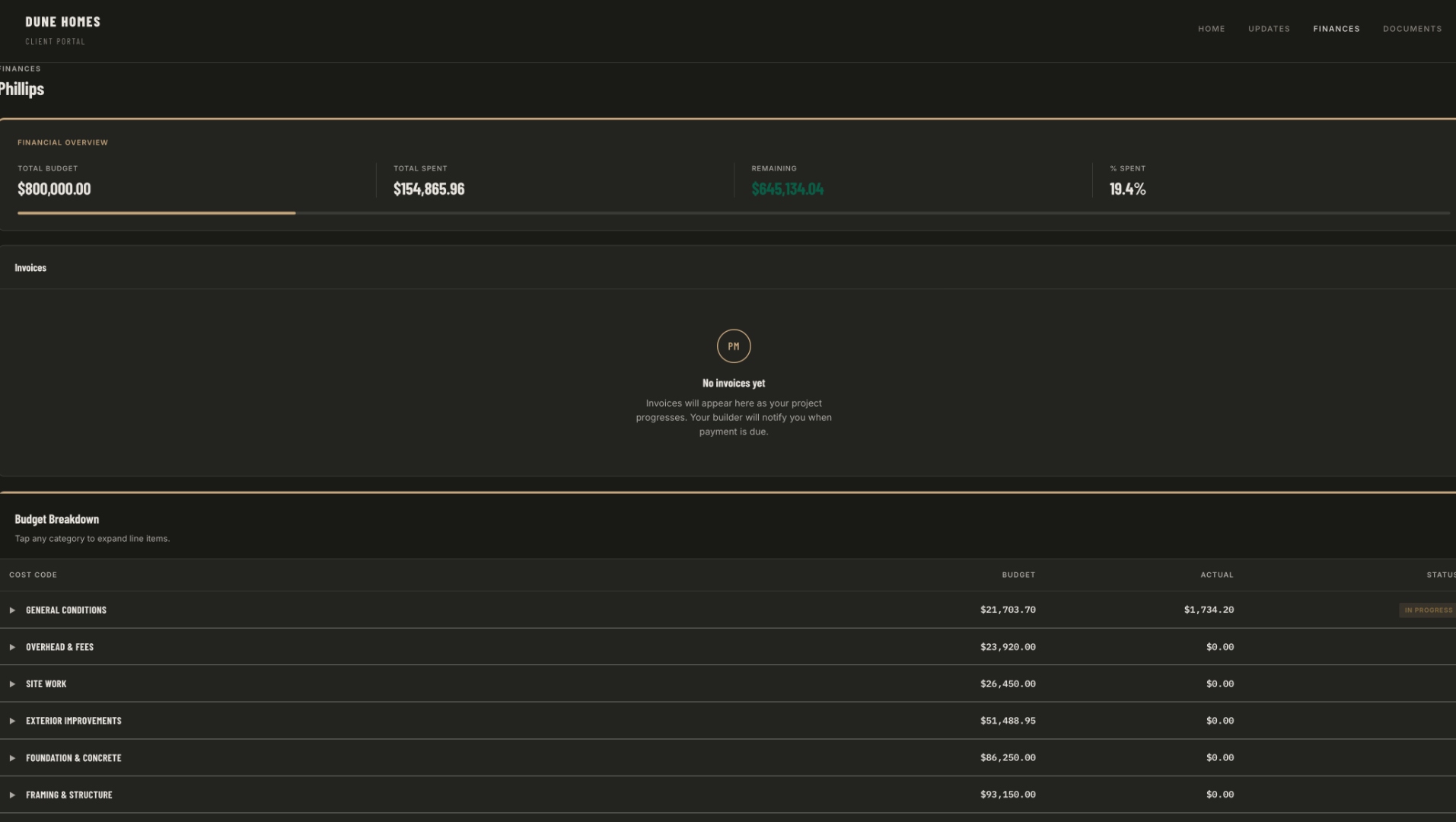
Every screen below is a live Dune Homes build. Yours looks the same — branded to your company.

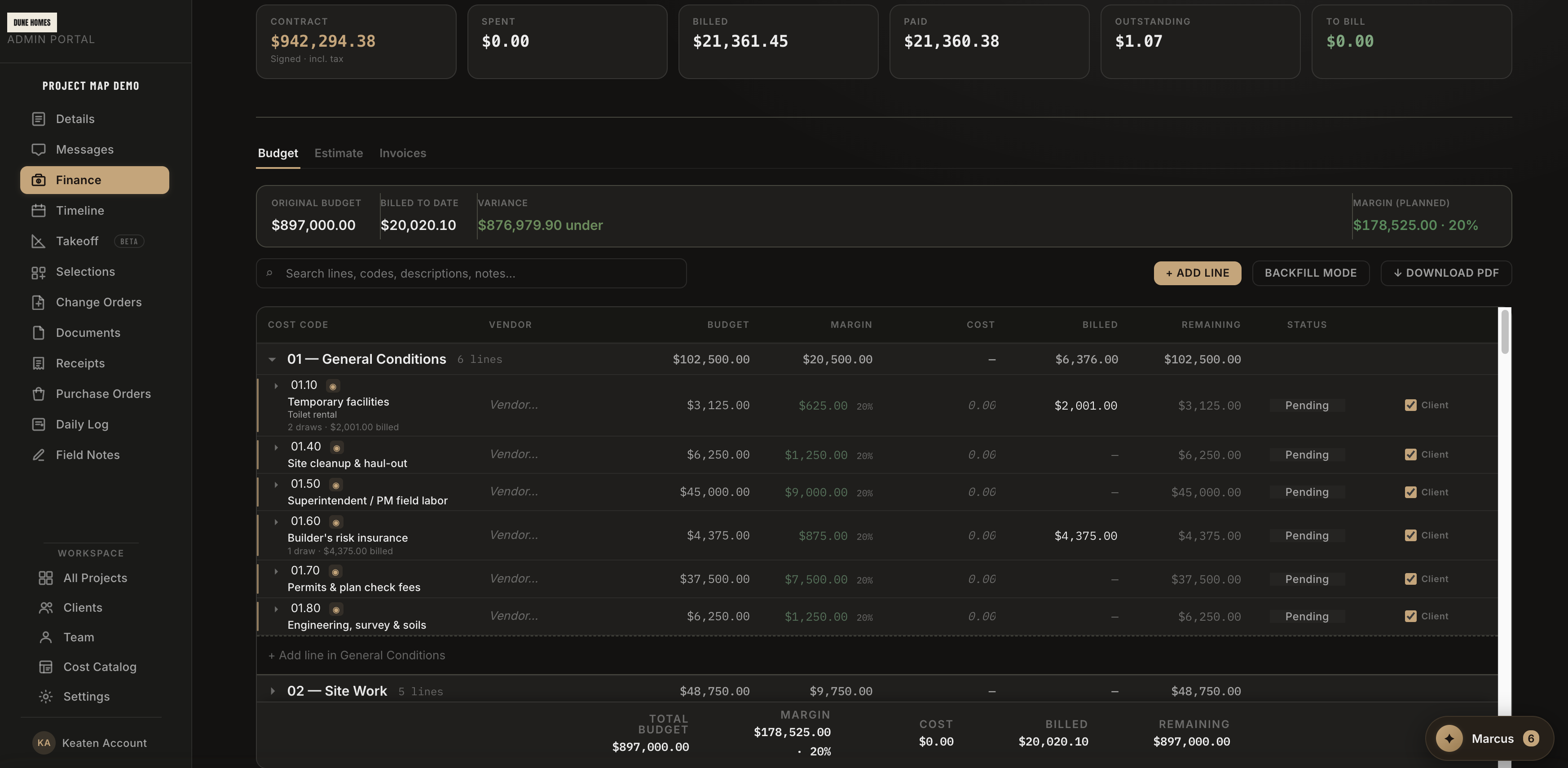
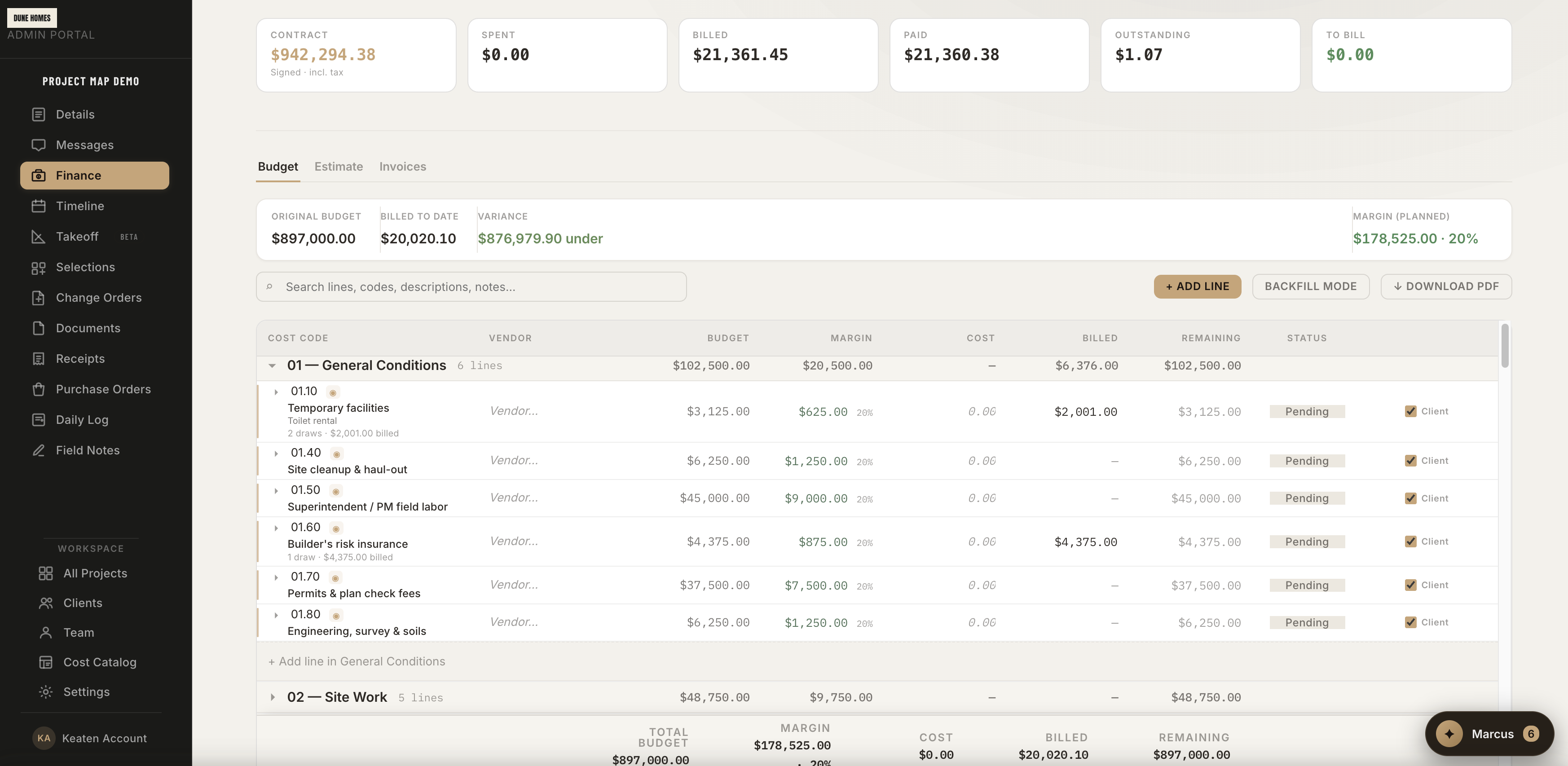
Job finance — budget, margin, and real cost from receipts, on one screen


Client finances — your brand on every number, Pay Now built in


Get paid — and never double-enter.
Card or bank transfer, one Pay Now
Every invoice carries a Pay Now your clients can actually use — card for speed, US bank transfer (ACH) for the big draws, at a fraction of card fees. Payments mark the invoice paid automatically, the client gets a receipt and a permanent PDF in their Documents, and their Finances page shows what they've paid, when, and how. Already invoicing through QuickBooks? Keep your QBO pay links — you pick the rail, clients just see “Pay Now.”
- ACH on big draws. Bank transfers cost a fraction of card fees when the check has a comma in it.
- Auto-reconciled. A payment marks the invoice paid and notifies you — no chasing, no marking things by hand.
- Honest about timing. Bank transfers take a few days to clear — the portal says so, to you and your client.
- A paper trail that holds up. Paid invoices archive as tamper-protected PDFs with a full audit trail.
QuickBooks sync, optional
You run the whole job inside Project Map. Connect QuickBooks Online and the money side moves with one click: push an invoice or expense — job-costed to the right job and categorized to your accounts — and pull payment status back so paid and outstanding always match. Your clients and projects sync as QuickBooks customers and jobs, for accurate per-job profit and loss.
You don't need QuickBooks to use Project Map. It's an option, not a requirement.
- One-click connect. Secure sign-in (OAuth) — no API keys, no technical setup.
- Customers & jobs sync. Each client becomes a QuickBooks customer, each project a job.
- Push invoices & expenses. Job-costed and categorized, in one click.
- Payment status pulls back. Paid, partial, and outstanding flow into Project Map.
- Never creates duplicates. Smart matching keeps your books clean.
Your data. Your portal. Your terms.
No forced contracts. No “call sales to leave.” Pay monthly, save with annual, or own the whole thing outright — and cancel yourself, from Settings, without emailing anyone.
Walk away whenever you want, with every job, budget, and selection exported to CSV. Your branding, your app, your client relationships, your data. We keep your branded portal live for 90 days after cancellation.
The relationship works for as long as it works for you.
Buy it. Claim it. You're in.
Buy now
Pick a plan, check out. No sales call, no “we'll reach out,” no waiting on anyone.
Claim your portal
Right after checkout you pick your company name and web address. Your branded portal is live before your coffee's cold — welcome email and all.
Explore a real job
Your portal opens on a fully lived-in demo project — signed contract, invoices, selections, budget — so the first five minutes teach you the product. Delete it in one click when you're ready to build.
Founder pricing. No setup fees. Cancel anytime.
Three ways to run Project Map: annual (the smart money), month-to-month, or owned outright. You're live the minute you buy. Founder pricing won't last — but once you're in, it's locked for the life of your subscription.
Paying for a year? See it first — book a demo →
Your branded portal, live at your own web address the minute you buy. Full workflow, your app on clients' phones. 1 team seat included. No setup fee.
- Branded portal + installable client app
- Estimates, budgets, bank draws, change orders, selections
- Online payments (card + ACH), receipts & Marcus AI
- Unlimited projects & client logins
- QuickBooks Online sync (optional)
- 1 team seat (+$20/mo per additional seat)
- Email support, 48-hour response
No setup fee. Cancel anytime. Your data exports as CSV.
Full white-label on your own custom domain — we set it up with you. 5 team seats for the office and the field. No setup fee.
- Everything in Remodeler, plus:
- Custom domain (portal.yourcompany.com) — we set it up with you
- Custom email domain for client notifications
- 5 team seats (+$20/mo per additional seat) — field roles included
- Priority support — Slack + phone, 24-hour response
- Quarterly product reviews
No setup fee. Cancel anytime. Your data exports as CSV.
The whole codebase, configured to your brand, on your own Firebase project. Year 1 updates and support included. You own it.
- Everything in Builder, plus:
- Self-hosted on your own Firebase project
- License owned forever — no monthly hosting bill
- Year 1: all updates & priority support included
- Year 2+: optional updates & support from $99/mo
- Unlimited team seats
- Live in ~1 hour once you send branding + Firebase keys
Or pay over time with Affirm at checkout — own it for around $226/mo.
3 of 10 founding licenses claimed. After the 10th, the price moves to $15,000.
- Your data is yours — full CSV export anytime, no hostage situations
- Cancel hosting anytime, no penalty, no “account manager”
- Branded portals preserved for 90 days after cancellation
- Founder pricing locked in for the life of your subscription
I run Dune Homes in Bend. I ran every platform you've heard of — none got the bank side right. The draw schedule is half a custom build, and I was doing it in spreadsheets while paying $400/mo for software my clients ignored. So I built Project Map. Now my clients actually log in — they think it's ours.
Common questions.
Each client gets their own secure login at your branded portal — your web address the minute you claim it, or your own custom domain (portal.yourcompany.com) on Builder, which we set up with you. Either way clients see your logo, your colors, your company name on the login screen, in the app, and in every notification — Project Map shows up nowhere.
Marcus is an AI employee built into Project Map. He reads your project data — receipts, invoices, selections, documents — and drafts the writing you keep putting off: daily logs, receipt entries, selection updates, and weekly client updates. He works propose-then-approve: Marcus drafts, and nothing is saved or sent to a client until you approve it.
It's a one-click connection — no API keys, no setup. Connect QuickBooks Online from Settings and choose which income, expense, and payment accounts to use. From there you push invoices and expenses straight to QuickBooks (job-costed and categorized), sync clients and projects as QuickBooks customers and jobs for accurate per-job P&L, and pull payment status back so paid/outstanding stays current. It's optional — Project Map runs fine without it — and it covers customers, jobs, invoices, and expenses. It doesn't replace payroll or vendor bills.
There's nothing to download — and that's the point. Your branded portal installs to their home screen straight from the browser in one guided tap, on iPhone and Android. The icon shows your logo and your company name, push notifications come from your app, and there's no app store, no Apple review, no “Project Map” anywhere.
Yes — that's what field seats are for. Your crew adds daily logs and snaps receipts from their phones; Marcus reads each receipt into coded line items that land on the budget's cost column. Field roles see zero financials — no budgets, no margins, no contracts. Roles are enforced server-side: Admin, Project Manager, Field, and Bookkeeper each see exactly what they should.
Yes. The builder workspace, finance, estimates, and daily log all adapt to phone width, and your clients get the same branded portal on mobile. On a phone the schedule shows the calendar view; the Gantt stays on desktop, where it's actually readable.
Portal appearance is set per company — light or dark — along with your logo, accent color, and company name, applied across the portal. Most brands look best in light; it's your call.
Cancel anytime, no penalty. We preserve your branded portal for 90 days so you can wrap up active jobs or move data, and you export everything as CSV in one click — jobs, budgets, selections, change orders, contacts. No annual contract, no “call sales to leave.”
About a minute, and we're not exaggerating: buy, pick your company name and web address on the next screen, and your branded portal is live — with a fully built demo project inside so you're exploring a real job, not staring at an empty dashboard. Upload your logo and accent color whenever you like. No sales call, no onboarding period, no waiting on us.
Most builders start their next job in Project Map and let active jobs finish out on the old platform — no mid-job migration drama. Your free 60-minute onboarding call gets your company, cost codes, and first real job set up. And since there's no contract, you're not betting the company on the switch: run one job in it and see.
No trial — something better. The minute you buy, your portal opens on a fully built demo project: signed contract, invoices, selections, budget. You're exploring a real job in your own branded portal, not a stripped-down sandbox. And with no contract and cancel-anytime from Settings, your first month is the trial.
Ready to be the builder with the app?
Buy now and your branded portal is live in a minute — no sales call, no setup fee, no waiting on anyone. Want to see it first? Book a demo and I'll show you Project Map running on my own Dune Homes jobs. Builder to builder.